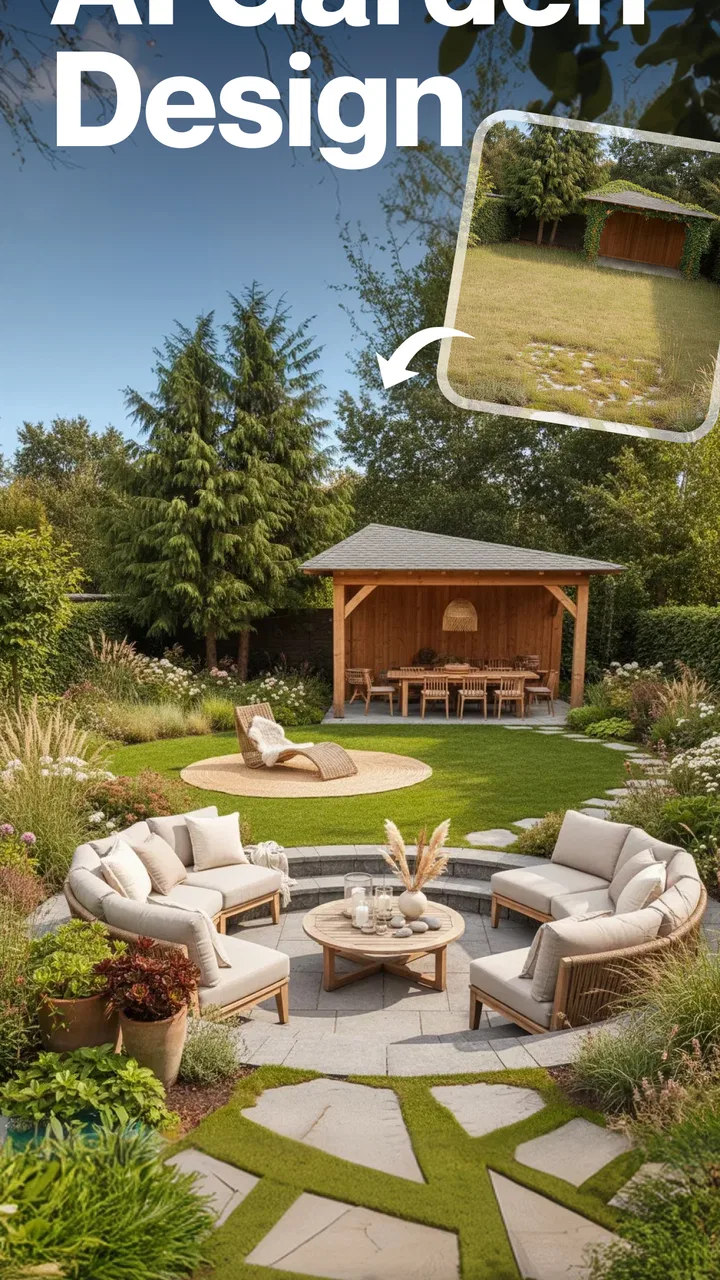
Landscape Design - AI Garden
- 4.4
- Rating
- 100.00K
- Installs
- Free
- Price

 Analysis by App-foxy
I approached Landscape Design - AI Garden as a practical companion for people who want to rethink an outdoor space before moving soil, buying plants, or rearranging furniture. It sits in the House & Home category and focuses on garden, backyard, patio, and landscape inspiration. My first impression was that it works best as a visual starting point rather than a complete landscaping plan. It helps turn a vague idea such as “make this corner more inviting” into a clearer direction, especially when I use it alongside photos, measurements, and a realistic budget.
The app is free to install, with optional in-app purchases ranging from $3.99 to $199.99 per item. That makes it easy to try without committing money immediately, but it also means I would pay attention to which parts are available before building my entire planning routine around it. It is rated for Everyone, runs on Android 8.0 and later, and the current version is 1.0.36. The developer is MOBIVERSITE YAZILIM BILISIM REKLAM VE DANISMANLIK.
How the app feels when the connection is doing the work
The most important thing to understand is that this is an experience shaped by connectivity. Ideas, image-based exploration, and any AI-assisted interaction depend on the app being able to communicate with its online services. On a reliable home network, that relationship fades into the background and the process feels fairly natural: I can focus on the garden problem instead of thinking about the technology behind it.
You May Also Like

 Blood Strike: 2.5 Anniversary
Blood Strike’s Loadouts Turn Every Drop Into a Tactical Gamble
A close look at Blood Strike’s custom loadouts: how fast access to signature weapons reshapes its battle royale rhythm, rewards preparation, and narrows the gap between fights.

 Pandora - Music & Podcasts
Pandora’s Music Is Easy to Start, but Harder to Recover
Pandora’s strength is its low-effort path from a seed to a station. Its weak spot is how much confidence it asks you to place in connection, setup, and quiet recovery.

 8 Ball Pool
 Is Built on Rivalries, Rematches, and Routine
A close look at the rivalries, rematches, shared routines, and unanswered safety questions that turn a quick pool match into a persistent mobile community.

 Samsung Music
’s Quiet Strength Is Playing What You Already Own
Its reach comes less from spectacle than from dependable access to a personal library. That simplicity is both the app’s strongest retention engine and its ceiling.

 AccuWeather: Weather Radar
AccuWeather Review: A Quick, Clear Forecast for Everyday Decisions
For everyday plans, the best forecast is the one you can understand quickly. AccuWeather makes rain timing, radar, and local conditions easy to act on, with a few trade-offs.

 Hill Climb Racing
Why Hill Climb Racing Still Turns Crashes Into One More Run
A tiny car, a bumpy hill and one more upgrade: Hill Climb Racing keeps resurfacing because its simple chaos makes every near-miss feel personal.
More From Our News Desk



That changes when I use it in a backyard, on a balcony, or at a garden center where the signal is inconsistent. A request may take longer to respond, an image may need another attempt, or the flow may feel interrupted while content loads. I would not treat it like a paper notebook that is equally useful everywhere. Its strongest moments happen when I have a stable connection and enough time to examine the suggestions rather than rushing through a purchase.
This online dependence is not automatically a weakness. Visual design tools often need remote processing and image handling, and a connected workflow can make the app more capable than a simple collection of static articles. The trade-off is that the experience is less predictable in places where reception is poor. Before leaving home, I would save screenshots of promising directions and write down the practical details I need, such as preferred materials, plant sizes, and the dimensions of the area.
A useful habit is to separate inspiration from verification. I can use the app while connected to explore a mood—structured, natural, colorful, shaded, or entertaining—but I should not assume that a visual result confirms local suitability. Sun exposure, drainage, frost, wind, pets, children, and maintenance requirements still need checking elsewhere. The app can help me decide what I like; it should not replace observation of the actual site.
Planning from a phone instead of a desk
Landscape decisions rarely happen only at a desk. I may notice an empty patio while drinking coffee, photograph a tired planting bed during a walk around the house, or compare outdoor furniture while shopping. A mobile app is useful in these moments because it keeps the first stage of planning close to the place I am trying to improve.
I found the phone format most helpful for quick visual decisions. Rather than opening a full design program, learning a complicated interface, and entering every measurement, I can begin with a simple question: what kind of atmosphere would make this space more useful? That low barrier is valuable for renters, first-time gardeners, and homeowners who know they dislike their current layout but cannot yet describe the solution.
There is also a practical limit to designing on a small screen. Fine comparisons can become tiring, and a phone image may hide details that matter in real life. A narrow walkway can look generous in a cropped photo, while a chair that appears attractive may block a gate or maintenance route. I would use the app while standing in the space, then review the result on a larger screen or with printed notes before spending money.
For a realistic everyday scenario, imagine a small patio that is rarely used because it feels exposed and unfinished. I could take a clear photo from the doorway, use the app to explore a warmer outdoor arrangement, and note which elements keep appearing in the ideas: seating, screening, lighting, containers, or a stronger focal point. Then I could measure the patio, check where the sun falls at different times, and price only the two or three changes that solve the main problem. That is a much safer workflow than copying every attractive detail from one generated image.
The same approach works for a neglected side yard. Instead of asking the app to create an impressive makeover, I would divide the problem into functions: access to bins, a clear path, storage, privacy, and a small area for plants. This produces more useful decisions because the design is judged by daily movement rather than by appearance alone. The app is particularly good at helping me articulate the visual direction after I have identified those practical needs.
What to do when a session breaks
Connectivity problems are easier to manage when I treat each session as a short design exercise rather than a single uninterrupted project. I would begin with one area and one question, keep the original photo on my phone, and record the ideas I want to revisit. If the connection fails, I can return later without having to reconstruct the entire thought process.
Clear photos also reduce wasted attempts. I would avoid shooting through a window, using a dark evening image, or including too much unrelated scenery. A straight-on photo with visible boundaries gives me a better reference for discussing the space. Taking a second image from the opposite direction is useful when the first view hides a door, slope, fence, or access route.
If a result feels surprisingly unsuitable, I would not immediately blame the app. The input may not explain that the area is shaded, shared, sloped, rented, or needed for storage. I would refine the request with constraints and try again when the connection is stable. Still, recovery has a cost: repeated attempts consume time, and a user on a weak mobile signal may find the process frustrating. For that reason, I prefer experimenting at home and using outdoor sessions for observation and comparison.
Another recovery tip is to keep a simple “decision trail.” I would note the original problem, the visual direction I liked, and the changes I am actually willing to make. This prevents a later result from pulling the project in a completely different direction just because it looks more dramatic. It also makes it easier to explain the plan to a partner or contractor.
Using mobile data without losing control of the process
Because the experience relies on online communication, I would be deliberate about when I use mobile data. Exploring several ideas in quick succession can be convenient, but I would reserve heavier visual work for a trusted Wi-Fi connection when possible. This is especially sensible if I am working with multiple photos or revisiting the same space repeatedly.
I would also avoid treating every generated variation as necessary. A focused session with three clear directions is more useful than an endless stream of near-duplicates. For example, I might compare a low-maintenance patio, a planting-led design, and a social seating layout. Once one direction clearly fits my needs, I would stop exploring and move to measurements, materials, and maintenance questions.
Privacy is another reason to be thoughtful with images. Before photographing a backyard, I would check what appears in the frame: house numbers, faces, neighboring windows, documents, or anything else unrelated to the design. Cropping the image to the garden area can make the request more focused and reduce unnecessary exposure. I would not upload a wider scene simply because it is easier to capture.
Data-conscious use also improves the quality of the advice I can act on. A carefully framed image and a short, specific description are better than a large collection of casual photos. I would include the constraints that affect the result—whether the space is for dining, play, pets, privacy, or low maintenance—without adding personal details that have nothing to do with the garden.
Where it beats familiar alternatives
Compared with browsing ordinary image boards or general search results, the app feels more directed toward turning inspiration into a response to my own outdoor space. Static galleries are excellent for collecting styles, but they can leave me with hundreds of attractive examples and no clear next step. This app is more useful when I want to move from “I like this look” to “how might this corner feel if I changed its layout?”
Compared with professional landscape software, it is less intimidating and faster to approach. A detailed planning program may offer exact dimensions, plant libraries, construction layers, and technical documentation, but that power comes with a learning curve. I would choose professional software or a landscape designer when drainage, retaining walls, irrigation, grading, or construction accuracy is central. I would choose this app earlier in the process, when the main challenge is deciding on a direction.
It also differs from hiring a designer in an important way: it does not replace a site visit or professional judgment. A designer can notice soil conditions, access problems, local climate, and structural risks that a photo-based idea may overlook. For a modest refresh, the app can help me prepare better questions and avoid buying random items. For a major renovation, I would use it as a conversation aid rather than as the authority.
The app is less suitable for someone who wants a precise shopping list, an automatically accurate construction plan, or guaranteed plant recommendations for a particular region. It is also not the right first choice for a user who prefers offline planning with pencil, graph paper, or a local reference book. If my connection is unreliable and I mainly work away from Wi-Fi, the convenience may not outweigh the interruptions.
Small workflows that make the results more useful
My preferred workflow begins with the problem, not the decoration. I write down what is failing in the current space: no shade at lunchtime, nowhere to put tools, poor privacy, an awkward route, or too much maintenance. Then I use the app to explore visual answers to that problem. This keeps the design grounded and stops attractive but impractical features from taking over.
A second useful technique is to compare by function. I would create one direction for relaxing, one for entertaining, and one for easier upkeep, then judge them against the same questions. Which one preserves access? Which one works with the available light? Which one can I maintain during a busy week? This makes the app a decision aid instead of a source of endless visual distraction.
A third is to use a “reality check” immediately after inspiration. I would stand in the actual space with a tape measure, mark the footprint of proposed furniture using boxes or masking tape, and walk the route I need to keep clear. If the idea looks good on the phone but fails this test, I would revise it. This simple step catches problems that a polished image cannot show.
I would also keep paid features in perspective. Since the app is free to start but offers purchases from $3.99 to $199.99 per item, I would test the basic experience first and decide whether the additional value matches my project. A small balcony refresh may not justify a costly upgrade, while a homeowner comparing several substantial layout ideas may find more value in extended experimentation. I would never pay merely to chase a more impressive picture without a clear decision to make.
Who will get the most from it
I think this app is a strong fit for visually minded beginners, homeowners preparing a gradual outdoor refresh, and anyone who needs help explaining an idea to another person. It can make a vague conversation more concrete: instead of saying “something cozy near the fence,” I can show a direction and discuss what should remain, change, or be removed.
It is also useful for people who are comparing priorities rather than seeking one perfect style. A family may need seating, child-friendly circulation, storage, and plants at the same time. The app helps open that discussion, while the final plan still comes from measurements and compromise. Its Everyone content rating makes it approachable for a broad household audience.
I would be more cautious if I were planning complex construction, dealing with a difficult slope, or making decisions that depend on local regulations and technical safety. In those cases, visual inspiration is only the opening step. I would bring in a qualified professional before treating any concept as buildable.
My connectivity verdict
After using it as a connected source of outdoor ideas, I see Landscape Design - AI Garden as most valuable during the early and middle stages of planning. It can help me discover a visual direction, compare possible uses for a space, and communicate an idea without learning a demanding design program. Its mobile format makes spontaneous planning convenient, particularly when I am already looking at the garden I want to change.
The main caution is that the experience is not equally comfortable in every location. A weak connection can interrupt visual exploration, and a phone-sized image can encourage decisions that ignore scale or site conditions. I would use a stable network for focused sessions, keep notes and screenshots for continuity, and verify every important choice in the real space.
The app has built a respectable audience, with an average rating of 4.3 from around 13K ratings and more than 100K installs. It was released on May 1, 2025, so I would still approach it as a relatively young tool and judge it by how well it fits my own workflow rather than expecting the completeness of mature professional software.
My final recommendation is straightforward: try it if you need inspiration that feels closer to your own backyard than a generic gallery can provide. Start free, work with clear constraints, protect your mobile data, and do not confuse a convincing concept with a finished landscape plan. For quick visual exploration, it is worth having on an Android device that meets its minimum requirement. For technical design or unreliable connectivity, a professional tool, local expert, or offline method will be the better companion.
FAQs for Landscape Design - AI Garden
01What features does Landscape Design - AI Garden offer?
Landscape Design - AI Garden provides a comprehensive suite of tools for creating stunning garden layouts. It includes AI-driven design suggestions, plant databases, a virtual sketchpad, and 3D visualization features. Users can experiment with various plant arrangements, hardscape elements, and color schemes to visualize their dream garden before making any real-world changes.
02Is Landscape Design - AI Garden suitable for beginners?
Yes, the app is designed with beginners in mind. It offers an intuitive interface and guided tutorials that help users navigate the design process with ease. The AI suggestions are particularly beneficial for novices, providing inspiration and practical advice on plant choices and layout strategies to ensure successful garden planning.
03Can I customize my garden designs in the app?
Absolutely. The app allows for extensive customization, enabling users to adjust plant types, sizes, and placements. You can also modify hardscape elements like paths and patios. The app’s 3D visualization tool lets you see how these changes will look, ensuring your design meets your vision before any physical work begins.
04Does the app include a plant database with detailed information?
Yes, Landscape Design - AI Garden includes a comprehensive plant database. It provides detailed information on a wide variety of plants, including growth conditions, sun and water needs, and compatibility with other species. This feature helps users make informed decisions about which plants to include in their garden design.
05Is there customer support available if I encounter issues?
The app offers robust customer support, including in-app assistance and a dedicated help center. Users can access FAQs, tutorials, and contact support for specific inquiries. The team is responsive and ready to assist with any technical difficulties or questions regarding the app’s features and functionalities.
Pros
- Easy-to-use interface for quick navigation.
- AI suggestions for plant placement and care.
- Customizable 3D garden visualization.
- Extensive library of plants and materials.
- Frequent updates with new design features.
Cons
- Limited free features; in-app purchases needed.
- Occasional lag on older devices.
- Requires internet for AI features.
- Lacks integration with other design apps.
- Some plant data may need manual updates.

Landscape Design - AI Garden
Gallery